




مدتهاست به فکر فروش دوره آموزشی خودتی، اما درگیر ساخت سایت، درگاه پرداخت، حفاظت از ویدیوها و پیدا کردن راهی برای فروش هستی؟
لازم نیست برای هرکدوم سراغ یک ابزار جدا بری یا درگیر مسائل فنی بشی.
با دورهساز میتونی سایت آموزشی خودت رو راهاندازی کنی، دورههات رو با خیال راحت بفروشی و دانشجوهات رو مدیریت کنی؛ همه در یک پلتفرم.
تو روی آموزش و رشد کسبوکارت تمرکز کن؛ دورهساز ابزارهای لازم رو در اختیارت
میذاره.
آمادهای تخصصت رو به یک کسبوکار آموزشی تبدیل کنی؟
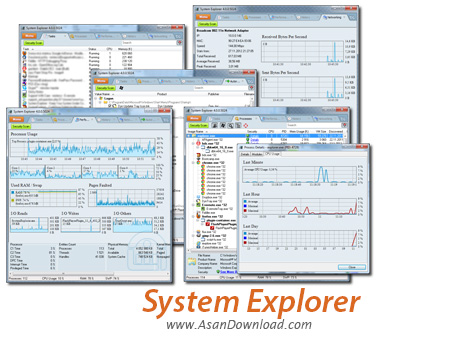
برای هر کاری نیاز به اطلاعاتی دقیق است، برای کار با رایانه نیاز است که بدانیم سخت افزار و نرم افزار در چه وضعیت قرار دارد؛ گاهی می خواهیم یک نرم افزار سنگین از نظر پردازشی را مورد استفاده قرار دهیم باید بدانیم آیا بخش های مختلف نرم افزار که در اختیار داریم می تواند جوابگوی نرم افزار ما باشد یا خیر؟ اطلاعات دقیق سیستم را همیشه می توان با نرم افزارهایی که در این زمینه ارائه شده اند بدست آورد. System Explorer نرم افزاریست که تمامی اطلاعات سیستم رایانه ای را
به نمایش در خواهد آورد. ریزترین موارد در این ابزار قابل مشاهده خواهد
بود؛ از مشخصات آنچه در حال اجرا هستند گرفته تا اطلاعاتی پیرامون Addone
هایی که روی IE فعال هستند همه نمایش داده خواهند شد تا کاربر بتواند با
اطلاعاتی دقیقی که پیرامون سیستم خود بدست می آورد به کار و برنامه ریزی
روی آن بپردازد. این ابزار که نمونه ی کاملی از Task Manager ویندوز می باشد Performance یا همان کارآیی سیستم را هم به نمایش در خواهد آورد؛ نمایش اطلاعاتی پیرامون درایورها، کانکشن ها، آنچه در Startup بارگزاری می شوند، Explorer ویندوز، نرم افزارهای نصب شده و ده ها قابلیت دیگر در نرم افزار System Explorer گنجانده شده اند تا کاربر به واسطه آن ها بتواند همیشه با اطلاعات دقیقی که بدست می آورد به کار با رایانه خود بپردازد.
قابلیت های کلیدی نرم افزار System Explorer:
- نمایش اطلاعات دقیق از پردازش های در حال اجرا در ویندوز
- نمایش اطلاتی پیرامون کارآیی سیستم
- نمایش آنچه مربوط به Explorer ویندوز می شود
- اطلاعات پیرامون درایورها
- نشان دادن تمامی کانکشن های فعال در ویندوز
- نمایش نرم افزارهای نصب شده در سیستم
- رایگان بودن نرم افزار
- سازگار با نسخه های مختلف ویندوز از جمله ویندوز محبوب 7 و 8
- و ...


System Explorer is one of the tools able to provide an in-depth analysis of your computer, displaying valuable information concerning the start-up programs, the running processes or the network connections.
One of the aces up its sleeve is definitely the interface. Very pleasant and intuitive, with nifty tabs at the top of the main window, System Explorer's interface makes everything very easy to use, thus addressing not only advanced users, but also beginners.
The tab bar can be fully customized by every user to show exactly the information he wants, so you can choose between tasks, processes, performance, additional info, uninstallers, modules, connections, autoruns, services, drivers, networking, WMI browser, history, snapshots, users and security info.
An impressive amount of information and it's all comprised in just a single window, as said based on the popular tabbed interface.
One of the most useful goodies in the whole application is the security scan that checks the running processes for suspicious activity using an online security database. In plain English, the processes will be scanned online through VirusTotal and Jotti services, so you'll stay on the safe side all the time.
System Explorer also comprises a settings screen with options concerning the way the app looks and works. For instance, you can choose to show fractional CPU usage and graphs, set System Explorer as the default task manager or enable history monitoring.
The amount of information provided by System Explorer is absolutely impressive, and this is the thing you will definitely like the most. There are tons of details in every single tab, along with graphs and useful tips, keeping the user up-to-date with what's happening with the system all the time.
If we were to vote for an improvement, we would most likely choose a local help manual because the application gets you to the official site of the developer whenever you try to open the available documentation.
All things considered, it's hard not to be impressed with System Explorer. It provides virtually all the information you will ever need on your computer, it's freeware, it runs on low resources and it works on all Windows versions. Simply brilliant!


