




مدتهاست به فکر فروش دوره آموزشی خودتی، اما درگیر ساخت سایت، درگاه پرداخت، حفاظت از ویدیوها و پیدا کردن راهی برای فروش هستی؟
لازم نیست برای هرکدوم سراغ یک ابزار جدا بری یا درگیر مسائل فنی بشی.
با دورهساز میتونی سایت آموزشی خودت رو راهاندازی کنی، دورههات رو با خیال راحت بفروشی و دانشجوهات رو مدیریت کنی؛ همه در یک پلتفرم.
تو روی آموزش و رشد کسبوکارت تمرکز کن؛ دورهساز ابزارهای لازم رو در اختیارت
میذاره.
آمادهای تخصصت رو به یک کسبوکار آموزشی تبدیل کنی؟
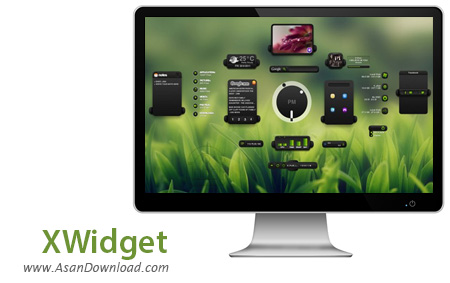
برای این پست نرم افزاری رایگان آماده کرده ایم که واسط گرافیکی ویندوز شما را کاملا متحول خواهد کرد و محیطی بسیار جذاب تر را برای کاربران آماده می کند. این ابزار که XWidget نام دارد با داشتن پوسته های جذاب در کنار ویجت های زیبا که دسترسی به گزینه های مختلف را آسان می کنند کمک می کنند کاربران در محیطی پویاتر به کار با رایانه های شخصی خود بپردازند. عدم کاهش کارآیی سیستم ، هماهنگی خاص با ویندوز و متعلقات آن و وجود ده ها ویجت با موضوعات مختلف از مهم ترین قابلیت های کلیدی این نرم افزار کاربردی محسوب می شوند. کاربرانی که این نرم افزار رایگان را دانلود می کنند از داشتن آن لذت خواهند برد چرا که به واسط گرافیکی ویندوز بسیار کمک خواهد کرد.
قابلیت های کلیدی نرم افزار XWidget:
- متحول شدن واسط گرافیکی ویندوز پس از نصب نرم افزار
- وجود ده های ویجت با موضوعات مختلف
- هماهنگی کامل با ویندوز و بخش های مختلف آن
- عدم کاهش کارآیی سیستم
- سازگار با نسخه های مختلف سیستم عامل محبوب مایکروسافت ویندوز
- و ...


XWidget provides you with a widget engine as well as an out-of-the-box selection of items for you to enjoy. The application comes packing a weather widget alongside other useful ones such as uptime, system, search, RSS, notes, Internet or photo album.
This particular piece of software can easily facilitate your everyday work by delivering the information you need in real time. It is also configurable to such extent that you may find yourself spending more time doing it than you initially planned.
On its first start, XWidget opens up the weather widget set to the Chinese city of Guangzhou, so it may be a good idea to configure this widget the first time. The service this component utilizes is the renowned AccuWeather, thus you can expect it to provide pretty authentic forecast. Like most weather programs, this one also features a Celsius / Fahrenheit switch.
Another widget that instantly starts when launching the engine for the first time is the clock. Its quite nifty design can make it a permanent companion, although the available options within the gallery on the web are various and waiting to be deployed to your desktop. The third and last widget that loads on first start is the photo album.
One of the advantages of XWidget is the level of customization. You can select any of the widgets and edit its every element. For instance, editing the clock component allows you to add components, modify the existing ones both graphically and functionally. The widget gallery for this particular engine is also impressive, counting hundreds of nicely done items.
All in all, XWidget can prove to be a trustworthy desktop companion for those of you looking for such an application. It can also be a great alternative to the discontinued Yahoo! Widget Engine with added customization capabilities and far more features overall.


