




مدتهاست به فکر فروش دوره آموزشی خودتی، اما درگیر ساخت سایت، درگاه پرداخت، حفاظت از ویدیوها و پیدا کردن راهی برای فروش هستی؟
لازم نیست برای هرکدوم سراغ یک ابزار جدا بری یا درگیر مسائل فنی بشی.
با دورهساز میتونی سایت آموزشی خودت رو راهاندازی کنی، دورههات رو با خیال راحت بفروشی و دانشجوهات رو مدیریت کنی؛ همه در یک پلتفرم.
تو روی آموزش و رشد کسبوکارت تمرکز کن؛ دورهساز ابزارهای لازم رو در اختیارت
میذاره.
آمادهای تخصصت رو به یک کسبوکار آموزشی تبدیل کنی؟
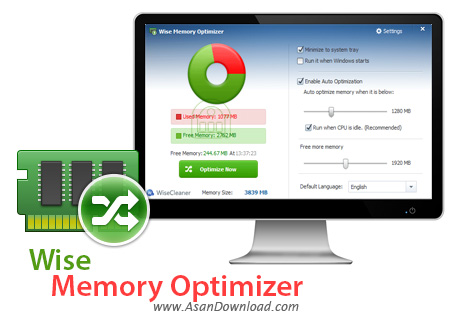
حافظه رم یکی از بخش های مهم و کلیدی سیستم محسوب می شود. بدون رم عملا هیچ یک از کارهای سیستم انجام نمی پذیرد و هرچه حافظه رم آزادتر باشد سرعت عملکردها افزایش پیدا می کند. به صورت سخت افزاری افزایش رم گاهی امکانپذیر نیست ولی می توان با یک سری بهینه سازی ها حافظه رم را آزادتر نگه داشت. Wise Memory Optimizer نام نرم افزاری کاربردی است که امکان بهینه سازی و پاکسازی دائمی حافظه رم را به کاربران می دهد. این ابزار با یک سری بهینه سازی های خاص حافظه رم را خالی می کند تا هم سیستم عامل و هم نرم افزارها بهتر اجرا شوند. به راحتی می توان با یک کلیک ساده حافظه رم را بهینه کرد تا نهایت کارآیی آن حاصل شود. انعطاف پذیری بالای نرم افزار در کنار یک واسط گرافیکی ساده و حجم پائین از جمله مهم ترین خصوصیاتی هستند که در این ابزار به وضوح به چشم می آیند.
قابلیت های کلیدی نرم افزار Wise Memory Optimizer:
- بهینه سازی حافظه رم به صورت لحظه ای
- نمایش آمار RAM به صورت زنده
- انعطاف پذیری بالای نرم افزار برای خواسته های کاربران
- سهولت در بهره گیری از نرم افزار
- انجام بهینه سازی به صورت اتوماتیک
- اجرای سریع نرم افزار و حجم پائین آن
- وجود تنظیمات مختلف برای اجرای سلیقه کاربر
- افزایش سرعت بارگزاری ویندوز پس از بهینه سازی
- پشتیبانی از زبان پارسی
- سازگار با نسخه های مختلف سیستم عامل محبوب مایکروسافت ویندوز
- و ...


Wise Memory Optimizer is a lightweight and portable piece of software whose goal is to optimize the performance of your computer by freeing up physical memory, as the name implies. It is oriented toward all types of users, even the ones with little or no experience in such tools.
Since installation is not a requirement, you can drop the program files anywhere on the hard drive and run the executable file directly.
As an alternative, Wise Memory Optimizer can be moved to a USB flash drive, external hard drive or similar storage unit, so you can run it on any computer without prior install operations.
What's more important is that the Windows Registry area does not get new entries (reducing the risk of system errors), and files do not remain on the hard drive after program removal.
The interface of the program is made from a small window with a simple layout. Wise Memory Optimizer automatically calculates and displays the used, free and total memory of your computer upon deployment, along with a pie chart. Optimization is initialized with the click of a button. Unfortunately, the tool does not reveal how much memory was saved after an optimization task.
A few options can be configured from the Settings screen. For instance, you can enable automatic optimization mode when the free memory is below a level that you can specify, and make Wise Memory Optimizer run even when the CPU is in idle mode, as well as adjust the amount of memory you want to free up.
In addition, you can set the tool to automatically run at system startup, minimize to the system tray area, and to clear the Clipboard while optimizing, as well as switch to a different language for the GUI.
The application requires a pretty low quantity of CPU and system memory, has a good response time and rapidly finishes an optimization job. No error dialogs have been shown in our tests and the tool did not hang or crash. All in all, Wise Memory Optimizer delivers a simple and effective solution to optimizing the system memory.


