



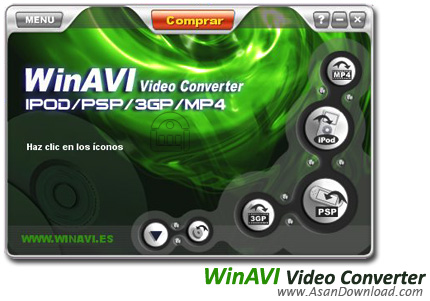
امروزه بسیاری از کاربران با استفاده از نرم افزارهای مختلف اقدام به تبدیل فرمت فایل های تصویری می نمایند، نرم افزارهایی که هر یک از آن ها با ویژگی های منحصر به فرد خود در این امر اختیارات متعددی را برای کاربران فراهم می کنند. بسیاری از این نرم افزارها که در حال حاضر مورد استفاده کاربران قرار می گیرد دارای محدودیت تبدیل می باشند.
بدین صورت که کاربران در آن ها قادرند تا تعداد مشخصی از فرمت های تصویری
مربوط به فایل های ویدئویی را به فرمت های مشخص شده ای تبدیل نمایند و در
میان این نرم افزارها، کمتر نرم افزاری به چشم می خورد که قابلیت تبدیل همه
نوع فرمت ویدوئی را به یک فرمت دلخواه دارا باشد. در این مطلب نرم افزاری
را به شما معرفی می کنیم که به کمک آن قادر به تبدیل فرمت فایل های تصویری
به فرمت دلخواه خود می باشید.WinAVI Video Converter نام نرم افزار مبدلی می باشد که به کمک آن
کاربران قادرند تا انواع مختلف فایل های تصویری را به یک فرمت دلخواه و
مورد نظر تبدیل نمایند. در این نرم افزار کاربران از ویژگی های متعددی
برخوردار می باشند و با این ویژگی های می توانند تبدیل فرمت یک فایل تصویری
را در کوتاه ترین زمان ممکن انجام دهند. این نرم افزار از تمامی فرمت های
تصویری پشتیبانی می کند و قادر است تا یک فایل را نیز به هر نوع فرمت
تصویری موجود تبدیل کند. این نرم افزار محصولی از شرکت ZJMedie Digital
Technology می باشد.
قابلیت های کلیدی نرم افزار WinAVI Video Converter:
- تبدیل فایل های تصویری به DVD
- تبدیل فایل های تصویری به VCD
- قابلیت تبدیل فایل های تصویری فلش ( SWF )
- قابلیت کپی مستقیم فایل های پس از تبدیل بر روی دیسک
- پیش نمایش از فایل ها در هنگام تبدیل به صورت همزمان
- حفظ کیفیت کامل تصاویر
- سازگار با نسخه های مختلف ویندوز از جمله ویندوز محبوب 7
- و ...


Video conversion isn’t quite a difficult job because there are a lot of
software solutions that promise to help you in this regard, but the biggest
challenge is to find one that really works. WinAVI Video Converter is a
Windows application that gets along pretty well with virtually all video formats
out there and, what’s more, it can also convert them to a number of other
formats. Just like its main window explains, WinAVI Video Converter is able to
convert any format to DVD, VCD/SVCD, MPEG1/MPEG2, AVI, WMV/ASF or RMVB. And
because we’re already discussing about the main window, WinAVI Video Converter
has quite a pleasant and user-friendly interface which shouldn’t give users many
problems. Once you make one step forward towards the conversion process per se,
you’re prompted to choose the output folder and the conversion mode, but geek
users will be delighted to find out that there are also a bunch of settings to
play with. It’s not mandatory to step into this side of the app, but WinAVI
Video Converter also gives the option to change encoder settings, adjust the
resulting video and its audio settings, the subtitle and some other preferences.
After a comprehensive test, we can confirm that WinAVI Video Converter is indeed
a very efficient software tool that not only preserves quality of the original
file, but it also boasts an impressive compression power. All in all, WinAVI
Video Converter is one of the best solutions on the market, and in case you’re
searching for such a tool, this one should be at top of the list.
Here are some key features of "WinAVI Video Converter":
· Fastest convert AVI to VCD/SVCD/DVD and support burning them. You can play it
on your home dvd player!
· Powerful video decompress/compress engine, the converting speed is fastest in
the world. Convert a whole movie in any format to DVD only need 90 minutes, to
SVCD only need 60 minutes and to vcd only need 30 minutes.
· Convert all video format to MPEG1/2 VCD/SVCD/DVD and burning them.
· Real Dolby AC3 audio encoder included.
· Real DVD Navigator encoder included.
· Convert all video format to AVI/DivX/XVid.
· Convert all video format to ASF/WMV
· Convert all video format to RM. (Real Video)
· Support QuickTime .MOV and Flash .SWF format.
· Easy to use.
· Stunning video and audio quality.
· Option to real-time or non real-time preview the video. That means you can
watch the video when you converting.
· Option to auto shutdown your computer when completed the conversion.




