



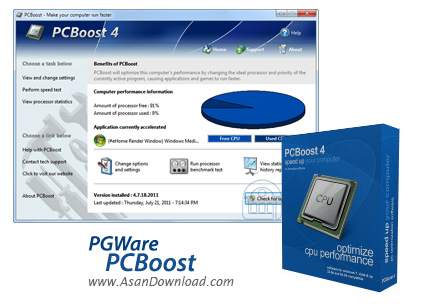
نرم افزار PCBoost ابزاریست در جهت بهینه سازی پردازنده اصلی سیستم یا همان CPU که تمامی فرمان ها در کارکرد سیستم از سمت آن ارائه می شود. وقتی مغز سیستم درست کار کند مطمئنا بخش های دیگر هم بهتر عمل خواهند کرد و به همین دلیل است که می توان با بهینه سازی و آزاد کردن مغز سیستم تا حدود زیادی برای کارکرد و افزایش کارآیی سیستم تاثیر گذاشت. PCBoost هم این وظیفه را به بهترین شکل ممکن انجام خواهد داد، این ابزار با بهینه سازی بخش های مختلف سیستم عامل و انجام یک سری فعالیت های مربوط به CPU سرعت سیستم را به صورت محسوسی افزایش خواهد داد. بهینه سازی ها با این ابزار به شکلی خواهد بود که کارها به صورت اتوماتیک توسط خود نرم افزار صورت می گیرد و کاربر لازم تنها برای بهینه سازی یک کلیک انجام دهد تا بازی ها و نرم افزارهایی که دائما CPU را درگیر می کنند کمی فضای مغز سیستم را آزادتر گذارند تا بهتر بتواند تصمیم گیری کند.
قابلیت های کلیدی نرم افزار PGWare PCBoost:
- بهینه سازی بازی ها و نرم افزارهایی که فضای زیادی از پردازنده را اشغال می کنند.
- اجرا به صورت مخفیانه در سیستم برای بهینه سازی لحظه به لحظه
- تنظیم خودکار کارها با نوع پردازنده ها
- تست پردازنده برای نمایش Benchmark آن
- نمایش اطلاعات کامل در مورد پردازنده
- نمایش لحظه به لحظه میزان مصرفی از پردازنده
- اضافه کردن نرم افزارهای سنگین به لیست سیاه
- قابلیت تنظیم دستی برای بهینه سازی
- سازگار با نسخه های مختلف سیستم عامل محبوب مایکروسافت ویندوز
- و ...


Squeezing every drop of performance out of your computer is only possible if you turn to an advanced software solution able to assist you in this regard, and we all know the market is full of such tools.
This is also the case of PCBoost, a very simple application that was designed for a simple purpose: help users boost computer performance quick and easy.
And although you may be tricked into believing that you're dealing with an extraordinary tool when first looking at its professional interface, just spend a minute to see what it's up to.
The main window presents a detailed graph with free and used CPU, but also reveals the name of the application currently accelerated. In addition, it gives access to three different menus, namely options and settings, processor benchmark test and statistics and history report.
Unfortunately, PCBoost isn't able to do any wonders on your computer, and the way it tries to improve performance is actually quite basic and you could even do it manually straight from within Windows.
PCBoost switches running processes priority between High and Realtime, depending on the active window at a given time, so you may even end up with a slower machine in case something goes wrong.
There's also a processor benchmark test that tries to determine access per second speed, clock speed, small and large integer calculation speed, all designed to help you determine how fast your processor really is.
On the other hand, the PCBoost statistics and history shows you the total processor usage and the available processor, as well as the currently accelerated window and its priority.
So as a conclusion, PCBoost is just a waste of time, but you could always give it a try to see what it's up to. Just think twice before spending your money of a full license.


