



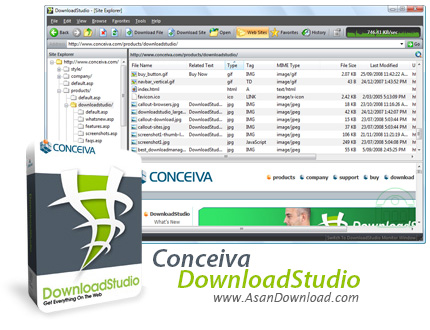
یکی از قدرتمندترین نرم افزارهایی که تا به حال برای مدیریت دانلود ها معرفی و طراحی شده است ابزاریست که Download Studio نام دارد. نرم افزاری متفاوت از ابزارهایی که تا به حال دیده ایم. ابزاری به سبکی نوین برای دریافت فایل ها از دنیای مجازی اینترنت که امکانات فراوانی را ارائه می دهد. این ابزار قدرتمند که قادر است خود را با 6 مرورگر بسیار معروف و رایج هماهنگ کند علاوه بر این کار افزایش سرعت دانلود در دریافت فایل ها را هم با خود به رایانه های کاربران می آورد. واسط کاربری بسیار جذاب و متفاوت نسبت به تمامی نرم افزارهای موجود در این زمینه، امکان دانلود از سایت های به اشتراک گذاری ویدئو های آنلاین نظیر Youtube.com ، دسته بندی خودکار فایل های دانلود شده، امکان ذخیره سازی کامل یک سایت برای مشاهده به صورت آفلاین، قابلیت ضبط صدا و تصویر ، دانلود همزمان دسته ای از فایل ها و ثبت آن ها به صورت یک مجموعه در نرم افزار ، قابلیت دانلود اخبار از فیدخوان ها و مرورگر داخلی نرم افزار برای مشاهده و گشت و گذار در اینترنت از مهم ترین قابلیت های نرم افزار Download Studio به شمار می رود. این ابزار همچنین با تقریبا تمامی پروتوکل های موجود هم سازگاری دارد و می تواند با پشتیبانی از آن ها فایل های مورد نظر را دریافت کند. این نرم افزار قدرتمند از مجلات معتبر توانسته بهترین امتیازها را کسب کند که یکی از دلایل موفقیت این ابزار هم همین عامل بوده است. برای کاربرانی که به اینترنت و دانلود فایل های خود اهمیت داده و همیشه سعی می کنند از بهترین ها استفاده کنند نرم افزار Conceiva Download Studio می تواند یکی از بهترین انتخاب ها باشد.
قابلیت های کلیدی نرم افزارConceiva DownloadStudio:
- واسط کاربری فوق العاده جذاب نرم افزار
- استفاده آسان از نرم افزار
- امکان دانلود با سرعتی چند برابر
- قابلیت دانلود همزمان چندین فایل
- دسته بندی دانلودها
- امکان دانلود از سایت های آنلاین ویدئو
- سازگاری با اکثر مرورگرهای محبوب
- سازگار با تمامی پرتوکل ها
- امکان ضبط صوت و تصویر
- مرورگر داخلی نرم افزار
- قابلیت دانلود کامل یک سایت
- سازگار با نسخه های مختلف سیستم عامل محبوب مایکروسافت ویندوز
- و ...


DownloadStudio is a software that enables you to download files, web pages, music, video, images, and others, from the online platform.
Installing this program is not too difficult. But you should keep in mind the fact that DownloadStudio installs a third-party component that it needs in order to fully function.
The interface of the tool is clean and easy to navigate through. You can access the "Quick Start" page to download multiple files or a range of files, or a website (limited to 1 or 2 levels of webpage links).
But you can also download all HTML files from a website, all SWF, FLV or JPEG files, photos from Facebook or Flickr, RSS feeds, podcasts and webpages that contain specific keywords.
Furthermore, you can get search results from Google or Yahoo, as well as create a search engine query job and capture audio and video from an external device.
Creating a task is easily done. You can enter the URL, set the username and password (if this is the case), specify the output destination and file name.
Optionally, you can synchronize download files with files on your computer and create a unique subfolder by using the current date-time. Now you can set DownloadStudio to immediately start a task or just to save the download job, as well as schedule a task for another time of the day.
Right before initiating the job, you can view the download summary and configure settings (e.g. auto categorize, create subcategories, priority, splits per file, change file extensions).
In addition, you can use a site explorer, search function, URL sniffer, RSS and podcast reader, as well as import job list files, enable clipboard monitoring, set the tool to turn off the computer after all downloads are finished, and more.
The program uses a low-to-moderate amount of system resources, includes a well-written help file with snapshots and quickly finishes a downloading task. No errors have occurred during our tests and the tool's overall response time is very good. We strongly recommend DownloadStudio to all users.


