



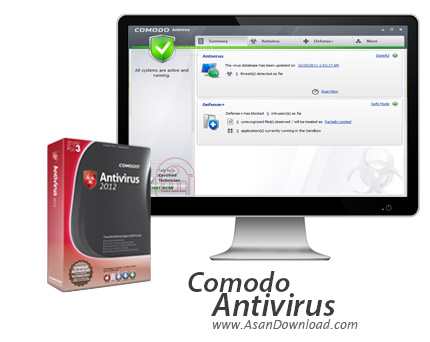
تامین امنیت امروزه به عنوان یکی از اصلی ترین موارد در سیستم های رایانه ای همیشه مطرح است. اینکه آنتی ویروسی داشته باشیم تا در مقابل انواع ابزارهای مخرب سیستم رایانه ای ما را محافظت کند اهمیت بسیار مهمی دارد. Comodo Antivirus آنتی ویروس بسیار قدرتمندی است که با دارابودن امکانات مختلف توانایی ایجاد محیطی امن و پایدار را در سیستم رایانه ای داشته و کاربران را در استفاده از یک سیستم بسیار ایمن یاری می دهد. به روزرسانی های سریع و مداوم این محصول امنیتی باعث شده تا جدیدترین لیست
از انواع فایل های مخرب در بانک اطلاعاتی نرم افزار قرار گیرند ؛ سرعت
بسیار بالا در عملکرد و اسکن هم بخش مهم دیگری است که در این آنتی ویروس به
چشم می خورد. Comodo Antivirus آخرین فایل های مخرب که شامل انواع ویروس ها ، کرم های اینترنتی ، نرم افزارهای مخرب جاسوسی را شناسایی کرده و برای حذف آن ها اقدام می کند. حالت Game Mode نرم افزار به صورت اتوماتیک فعال می شود. این آنتی ویروس که با آخرین تکنولوژی ها روز ساخته شده با سرویس ابری به مقابله با فایل های مخرب می پردازد ؛ اسکن سریع با استفاده از یک کلیک ، توانایی خصوصی سازی بخش های مختلف این آنتی ویروس و در نهایت استفاده فوق العاده آسان از آن جز مهم ترین امکاناتی هستند که در آنتی ویروس Comodo Antivirus جای گرفته اند.
قابلیت های کلیدی نرم افزار Comodo Antivirus:
- سرعت بسیار بالا در اسکن سیستم
- به روزرسانی های سریع و مداوم
- واسط گرافیکی بسیار جذاب
- سهولت در استفاده از نرم افزار
- امکان خصوصی سازی تنظیمات نرم افزار
- پایه گذاری شده براساس سرویس های ابری
- شناسایی آخرین فایل های مخرب
- وجود حالت Game Mode در نرم افزار
- مدیریت کامل برروی نرم افزارهای نصب شده روی سیستم
- سازگار با نسخه های مختلف سیستم عامل محبوب مایکروسافت ویندوز
- و ...


COMODO Antivirus is a strong security software that scans your computer and removes any malware, viruses or spyware that have infiltrated your system.
During installation, COMODO Antivirus offers to change your DNS servers to the COMODO SecureDNS server.
The user interface is easy to follow. In the first section you can view the current status on antivirus updates and on the defense system.
The antivirus system allows you to run a scan of the entire drive, in critical areas alone or according to your preferences, or only scan for spyware, but you can also schedule daily or weekly scans.
A log file allows you to view all antivirus events and notifications, while the scanner settings let you adjust the level of real-time scanning (on access, stateful, disabled).
Defense+ is a section of COMODO Antivirus where you can add or remove files to or from your local safe executable files database, run a program inside Sandbox, view a list of unrecognized files that are automatically placed inside Sandbox until further notice, set various rules (e.g. predefined policies, blocked files) and configuration options (e.g. security level, execution control level, Sandbox security level).
Additionally, you can manage the antivirus configuration settings, let the software diagnose an unsolvable problem, or manage an endpoint.
A full scan on the computer takes a really long time to finish, but COMODO Antivirus manages to detect and quarantine a lot of malicious agents, while using a small amount of system memory (although other processes run slower).
All in all, COMODO Antivirus has some powerful features for protecting your computer. The configuration may be a bit tricky for less experienced users, but running the software with the default options should be quite OK as well.


