



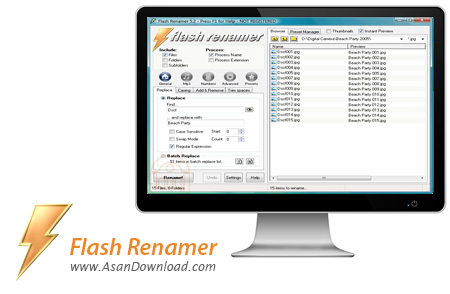
گاهی وجود یک نرم افزار ساده هم می تواند بسیار مفید باشد. نرم افزار کوچکی که می تواند کارهای بزرگی انجام دهد و در وقت صرفه جویی کند ؛ یکی از ساده ترین کارها در ویندوز Rename کردن فایل هاست. یعنی کاربر می تواند به راحتی فایل ها را تغییر نام دهد ؛ اما همین عمل ساده وقتی تعداد فایل ها زیاد می شود کمی دشوارتر خواهد شد و زمان بیشتری را طلب می کند و اگر هم بخواهیم نام فایل های صوتی را همراه با جزئیاتش که دیگر زمانی بسیار طولانی لازم است اما با نرم افزاری بسیار ساده به نام Flash Renamer می توان به راحتی تعداد زیادی فایل را Rename کرد.
این نرم افزار قادر است تا کار مدیریت نام ها را برای تصاویر ، موزیک ها و حتی فیلم ها انجام دهد. به راحتی می توان Tag های فایل های صوتی را آنطور که می خواهیم ویرایش کنیم و این هم به صورت کاملا اتوماتیک برای چندین فایل اعمال خواهد شد. Flash Renamer که از محیط کاربری ساده ای بهره می برد قادر است تا فایل ها را بر اساس کوچکی یا بزرگی حروف هم مرتب کند.
قابلیت های کلیدی نرم افزار Flash Renamer:
- سهولت در استفاده از نرم افزار
- امکان تغییر نام مجموعه ای از فایل ها به صورت همزمان
- امکان مدیریت و تغییر Tag فایل های صوتی
- امکان مرتب سازی براساس بزرگی و کوچکی حروف
- سازگار با نسخه های مختلف ویندوز از جمله ویندوز محبوب 7
- و ...


Flash Renamer is a simple-to-use tool that comes in handy the moment you want to batch-rename large amounts of files.
The interface of the application is clean and easy to work with. You can use the Explorer-based layout to locate and select the files whose names you want to alter.
There are several methods through which you can rename files. First of all, you can include all files, folders and subfolders in the list, as well as a filter. Besides the name, you can process the extension as well.
So, you can replace text (e.g. case sensitive, swap mode, regular expression), as well as change the filename and extension casing (e.g. preserve all upper case or mixed case words, enable exceptions).
In addition, you can insert or remove specific text, move a section to a particular position, trim spaces (e.g. leading, trailing), rename music files based on tags, edit ID3 tags and remove them from the songs, add a counter to the file name, as well as renumber files and input zero pad numbers.
On top of that, you can set attributes (e.g. hidden, archive, system), change the date and time, open and work with a CSV list, use a filename editor, load scripts, and more. Don\'t worry - you can use the undo function if you make any mistakes, so backing up the files is not necessary.
The application requires a low-to-moderate amount of system resources, includes a comprehensive help file with snapshots and worked flawlessly during our tests. Since it comes with so many advanced functions, we highly recommend Flash Renamer to all users, regardless of their experience level.


