




مدتهاست به فکر فروش دوره آموزشی خودتی، اما درگیر ساخت سایت، درگاه پرداخت، حفاظت از ویدیوها و پیدا کردن راهی برای فروش هستی؟
لازم نیست برای هرکدوم سراغ یک ابزار جدا بری یا درگیر مسائل فنی بشی.
با دورهساز میتونی سایت آموزشی خودت رو راهاندازی کنی، دورههات رو با خیال راحت بفروشی و دانشجوهات رو مدیریت کنی؛ همه در یک پلتفرم.
تو روی آموزش و رشد کسبوکارت تمرکز کن؛ دورهساز ابزارهای لازم رو در اختیارت
میذاره.
آمادهای تخصصت رو به یک کسبوکار آموزشی تبدیل کنی؟
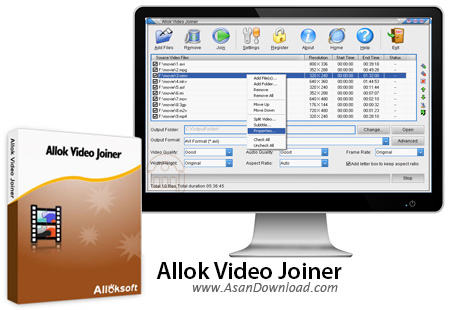
Allok Video Joiner یکی از کامل ترین نرم افزارهای به منظور به هم چسباندن فایل های ویدئویی به شمار می رود. این نرم افزار که قادر است تا از فرمت های مختلفی نظیر AVI، Divx، XviD، MPEG، WMV، ASF، RM، MOV، 3GP، MP4 پشتیبانی کرده و به جای چند کلیپ کوتاه یک فیلم چند ساعته را تهیه کند. هیچ گونه محدودیتی برای تعداد فایل های ویدئویی وجود نداشته و کاربر قادر است تا به سادگی به عنوان یک فیلم فایل ویدئویی را برروی انواع سی دی یا دی وی دی رایت نماید ، به طوری که این لوح فشرده رایت شده قابلیت پخش برروی انواع پلیرهای خانگی را نیز داشته باشد.
در خصوص کیفیت فایل ها در هنگام به هم چسباندن باید ذکر شود که به هیچ وجه تغییری در کیفیت اصلی ایجاد نمی شود. استفاده از Allok Video Joiner بسیار آسان بوده و کاربر می تواند حتی با Drag And Drop هم به سادگی فایل های ویدئویی را در این نرم افزار مورد ویرایش قرار دهد. واسط کاربری ساده این نرم افزار هم نقش مهمی در استفاده از آن نیز دارد ، چراکه به سادگی می توان انواعی از فرمت ها را در کنار هم جمع آوری کرد و در قالب یک فایل ویدئویی واحد مورد استفاده قرار داد.
قابلیت های کلیدی نرم افزار Allok Video Joiner:
- استفاده آسان از نرم افزار
- امکان استفاده از Drag And Drop
- پشتیبانی از تقریبا تمامی فرمت های ویدئویی
- امکان رایت به صورت مستقیم برروی انواع لوح های فشرده
- امکان استفاده از بی نهایت فایل ویدئویی در هنگام به هم چسباندن
- قابلیت تغییر صدا در خروجی فایل ها
- عدم افت کیفیت در هنگام Join کردن فایل ها
- پشتیبانی از حجم بالا در فایل ها
- سازگار با نسخه های مختلف ویندوز از جمله ویندوز محبوب 7
- و ...


Allok Video Joiner is a software that can merge and convert video files of various formats, including AVI, ASF, FLV, MPEG, 3GP and MP4.
The interface of the tool is simple and intuitive. You can import videos into the list by using the file browser or "drag and drop" method.
In the list you can check out the path, resolution, start and end time, as well as status of each file.
So, the process is easy: arrange your videos in the list, specify the output destination and format, and initiate merging.
In addition, you can configure audio and video settings when it comes to quality, size and height, frame rate and aspect radio (optionally add a letter box).
By accessing the "Advanced" window, you can select the audio and video codec, sample frequency rate and volume.
In "Settings" you can change the interface language, select the video decode engine and specify CPU priority. But you can also set Allok Video Joiner to automatically turn off the computer when the task is completed, split videos by specifying the start and end time, as well as load subtitles for the currently selected clip.
The converter requires a low-to-moderate amount of system resources, quickly finishes a conversion task and includes a step-by-step guide with snapshots for beginners.
However, it failed to convert and merge some file during our tests, for some unknown error. Otherwise, it manages to keep a very good image and sound quality. Also, the demo version is severely limited.We suggest you test Allok Video Joiner for yourself to see if it matches your preferences.


