



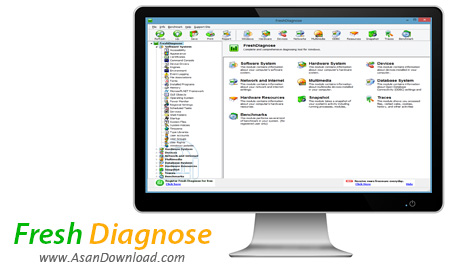
Fresh Diagnose نرم افزاری برای تست و بررسی تمامی سخت افزار های رایانه است. این نرم افزار این را قابلیت دارد تا تمامی قطعات سخت افزاری از پردازنده گرفته تا حتی ماوس و کیبورد سیستم را هم به صورت کامل اسکن کرده و اطلاعات کاملی از آن ها را به کاربر نمایش دهد.
به طور کلی اگر دنبال نرم افزاری برای یک چک آپ کلی از سیستم و اطلاع از سطح سلامت سخت افزار کامپیوتر خود هستید ، نرم افزار Fresh Diagnose را به شما توصیه می کنیم چرا که با استفاده از این نرم افزار می توانید عملکرد رایانه خود را در سطح بسیار مطلوبی بهبود بخشید. همچنین این نرم افزار قابلیت چک کردن رجیستری و عملکرد سیستم عامل و انجام تعمیر در صورت نیاز و چک کردن دستگاههای جانبی را نیز دارد.
قابلیت های کلیدی نرم افزار Fresh Diagnose:
- توانایی تست و بررسی تمام سخت افزار های کامپیوتر
- امکان چک آپ کلی از سیستم
- قابلیت اطلاع از سطح سلامت سخت افزار کامپیوتر
- بهبود عملکرد سیستم در سطح بسیار مطلوب
- قابلیت چک کردن رجیستری
- قابلیت انجام تعمیر برروی قطعات
- سازگار با تمامی نسخه های ویندوز از جمله ویندوز محبوب 7 و 8
- و ...


Fresh Diagnose is a powerful utility you can use to view detailed system information and benchmark your computer. It offers an impressive amount of details regarding hardware and software components.
Once the brief installation process is completed, you can initiate the program to discover a user-friendly interface that comes with many features. The tree view comes with a pull down menu where you can access information on the system components. This includes accessibility, appearance, certificates, device drivers, engines, event logging, file associations, fonts, memory, power monitor, scheduled tasks, startup, system files, BIOS, bus, cache memory, CMOS, memory, motherboard, plug and play, port connectors, processor, sensors, system slots etc.
Furthermore, you can obtain details on devices (hard disks, optical drivers, display monitors, partitions, logical drives, keyboard, mouse, ports, printers, etc), network and Internet (network adapters, TCP/IP configuration, Internet settings, mail accounts, network resources, shared resources, etc) and multimedia (DirectX, media control, mixer, video capture etc).
With Fresh Diagnose you can also get information on the database system, hardware resources (memory resources etc), snapshots (processes, modules, threads etc), traces (executed files, Windows history, run history, Internet cache and cookies etc), and benchmarks (processor, multimedia, memory, display adapter, hard disk, CD and network benchmark).
Each module loads the info in a reasonable amount of time and the benchmarks make this a great product for users who want to find out how much stress their system can endure. Fresh Diagnose uses a small amount of system memory and while testing it we didn't come across any glitch.
To sum things up, this application is one of the most complete of its kind and thanks to the ease of use, it addresses the needs of less experienced and advanced users alike.


