




مدتهاست به فکر فروش دوره آموزشی خودتی، اما درگیر ساخت سایت، درگاه پرداخت، حفاظت از ویدیوها و پیدا کردن راهی برای فروش هستی؟
لازم نیست برای هرکدوم سراغ یک ابزار جدا بری یا درگیر مسائل فنی بشی.
با دورهساز میتونی سایت آموزشی خودت رو راهاندازی کنی، دورههات رو با خیال راحت بفروشی و دانشجوهات رو مدیریت کنی؛ همه در یک پلتفرم.
تو روی آموزش و رشد کسبوکارت تمرکز کن؛ دورهساز ابزارهای لازم رو در اختیارت
میذاره.
آمادهای تخصصت رو به یک کسبوکار آموزشی تبدیل کنی؟
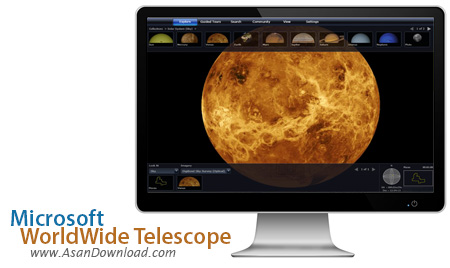
Microsoft WorldWide Telescope این نرم افزار جذاب که بوسیله كمپانی مایكروسافت طراحی شده است که تحت تكنولوژی Web2 بوده سیستم شما را به یک تلسکوپ مجازی تبدیل می نماید و به شما این امکان را می دهد تا تا شاهد بهترین و زیباترین عكس ها از تلسكوپ های فضایی باشید.
همچنین این نرم افزار به شما امکان استفاده از تلسكوپ های Spicer ، Chandra و Hubble را می دهد تا به راحتی و تنهایی به سیر در کهکشان ها و آسمان بپردازید. از ویزگی های کلیدی این نرم افزار ارائه اطلاعات لازم در تصاویر دریافتی، استفاده از تورهای راهنما ارائه شده توسط منجمان و محققان برجسته و ... اشاره نمود. حتی این نرم افزار به شما این امکان را می دهد تا به 2 میلیون سال قبل بازگشته و به مشاهده ی خلقت در آن زمان بپردازید و با موتور قدرتمندی كه در این نرم افزار وجود دارد می توانید آسمان را از زوایای دلخواه و مختلف تماشا نمایید. این نرم افزار که به صورت رایگان در اختیار شما قرار گرفته شده از آن دسته از نرم افزار های جذاب به شمار می آید.
قابلیت های کلیدی نرم افزار Microsoft WorldWide Telescope:
- قابلیت تبدیل سیستم به یک تلسکوپ مجازی
- قابلیت نمایش بهترین و زیباترین عكس ها از تلسكوپ های فضایی
- قابلیت استفاده از تلسكوپ های Spicer ، Chandra و Hubble
- تورهای راهنما ارائه شده توسط منجمان و محققان برجسته
- امکان سفر به میلیون سال قبل و مشاهده ی خلقت در آن زمان
- قابلیت نمایش آسمان از زوایای دلخواه و مختلف
- سازگار با تمامی نسخه های ویندوز از جمله ویندوز محبوب 7 و 8
- و ...


Microsoft WorldWide Telescope is an application designed for exploring the universe, including planets and constellations. It can be used by users of all ages.
The interface is modern and attractive, and includes an intuitive navigational system. You can move around using the mouse cursor, zoom in and out, rotate and tilt the view. Xbox 360 controllers are supported as well.
It is possible to filter the shown layers, such as planets, constellations, grids, field of view indicators, asteroids, the Milky Way, lighting and shadows, fade to black effect, and screen broadcast.
From the bottom part of the screen you can click an element to jump to it in the view mode. Microsoft WorldWide Telescope supplies users with several collections to choose from.
Plus, you can click the mouse right button to display the finder scope and details on coordinates, magnitude, distance, planet rise and set time, among others.
Additionally, you can use a search function, adjust telescope control settings, disable smooth panning, enable full web browser, use proxies, as well as create a new figure library of constellation lines.
Unfortunately, the application has a lower-than-average response time and uses high memory. We have noticed it slowed down the runtime of other applications in our tests. Nevertheless, Microsoft WorldWide Telescope offers a fun and interactive way to explore the universe.


