



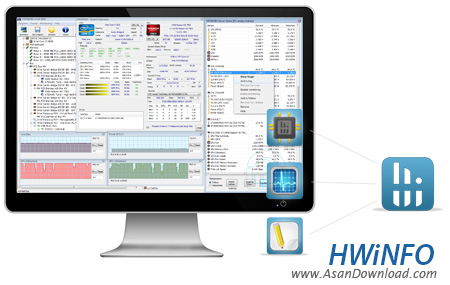
HWiNFO نرم افزاری حرفه ای و بسیار قدرتمند در زمینه نمایش اطلاعات دقیق سخت افزار می باشد. این نرم افزار می تواند تا بیشترین و دقیق ترین اطلاعات موجود در مورد سخت افزار های به کار رفته در کامپیوتر شما را ارائه کند. این برنامه به کمک ابزار های حرفه ای اطلاعاتی و تشخیصی که در خود دارد کمک قابل توجهی به کاربرانی که به دنبال درایورهای سخت افزار خود هستند، می کند. محیط کار این نرم افزار بسیار آسان و ساده می باشد و کاربران مبتدی نیز می توانند به کمک آن اطلاعات دقیقی از سخت افزارهای سیستم خود بدست آورند. این نرم افزار که به صورت رایگان ارائه شده است بدون نیاز به نصب است و استفاده از آن به فروشندگان رایانه و سخت افزار و پشتیبانان فنی و خریداران نیز توصیه می شود.
قابلیت های کلیدی نرم افزار HWiNFO:
- قابلیت ارائه بیشترین اطلاعات مربوط به سخت افزارهای نصب شده بر روی سیستم
- توانایی ارائه دقیق ترین اطلاعات موجود در مورد سخت افزارها
- امکان استفاده از ابزارهای حرفه ای، اطلاعاتی و تشخیصی سخت افزار
- قابلیت یافتن اطلاعات دقیق سخت افزارهای به کار رفته در رایانه
- توانایی نمایش اطلاعات کامل تمامی قطعات سخت افزاری
- قابلیت یافتن اطلاعات دقیق از سخت افزارها از کاربران مبتدی تا کاربران حرفه ای
- محیط کار ساده و کاربر پسند نرم افزار
- سازگار با نسخه های مختلف سیستم عامل محبوب مایکروسافت ویندوز
- و ...


If you want to get to know your PC in detail, the specification papers included in the package by the hardware manufacturer won't help you that much, that's for sure. Instead you can use one of the many dedicated software solutions out there, and HWiNFO is one of the best picks.
As its name suggests (an abbreviation for "hardware info"), HWiNFO is capable of getting in touch with all pieces of hardware in order to provide detailed information about each one.
One of the niftiest features we've discovered while testing the application was the summary report displayed every time HWiNFO is opened, thus immediately making available the most important details regarding our machine.
Of course, for a deeper investigation there's the main window that enables you to browse through all the possible of details regarding the CPU, motherboard, RAM, video adapters, monitors, drives, audio and network devices, ports and pretty much every other single piece of hardware bundled in the system.
Another interesting feature is the sensor reading tool that provides you with information on the temperature of your components in a single clean window. A benchmark function is also present in the feature set, but keep in mind that all the tests are going to take a while to complete.
All in all, it's safe to say that HWiNFO is the kind of tool that has pretty good chances to come in handy on every computer out there, especially since it can be used by beginners and power users alike.


