




مدتهاست به فکر فروش دوره آموزشی خودتی، اما درگیر ساخت سایت، درگاه پرداخت، حفاظت از ویدیوها و پیدا کردن راهی برای فروش هستی؟
لازم نیست برای هرکدوم سراغ یک ابزار جدا بری یا درگیر مسائل فنی بشی.
با دورهساز میتونی سایت آموزشی خودت رو راهاندازی کنی، دورههات رو با خیال راحت بفروشی و دانشجوهات رو مدیریت کنی؛ همه در یک پلتفرم.
تو روی آموزش و رشد کسبوکارت تمرکز کن؛ دورهساز ابزارهای لازم رو در اختیارت
میذاره.
آمادهای تخصصت رو به یک کسبوکار آموزشی تبدیل کنی؟
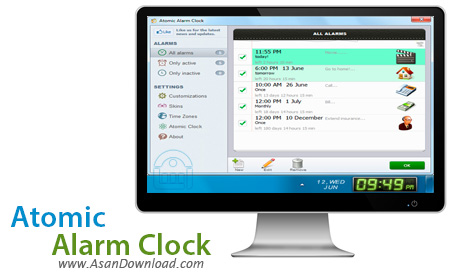
نرم افزاری که برای این مطلب آماده کرده ایم ساعتی دیجیتالی با امکانات متعدد است که زمان را برای کاربران با اهمیت تر نشان می دهد. این نرم افزار که Atomic Alarm Clock نام دارد امکاناتی نظیر نمایش زمان به تایم کشورهای مختلف ، هشدار در زمان های از پیش تعریف شده و ده ها قابلیت دیگر را در خود جای داده است. امکاناتی هم نظیر قابلیت گرفتن تایم به صورت کورنومتر، نمایش به حالت های مختلف و دلخواه کاربران، زمان بندی عملکردها و قابلیت تنظیم ساعت برای انجام برخی کارها مواردی هستند که در این نرم افزار سبک قرار دارند و کمک می کنند تا کاربر زمان و استفاده از آن را بهتر در کارها بهره بگیرد.
قابلیت های کلیدی نرم افزار Atomic Alarm Clock:
- محیط گرافیکی جذاب نرم افزار
- امکان استفاده به صورت تایمر
- قابلیت بهره گیری به عنوان هشداردهنده
- نمایش مشخصات و سخت افزارهای سیستم
- تنظیم ساعت با کشورهای مختلف
- سازگار با نسخه های مختلف ویندوز از جمله ویندوز محبوب 7 و 8
- و ...


Atomic Alarm Clock is an application that comes to replace the standard Windows clock and offers users a bunch of extra utilities not yet available in Microsoft's operating system.
The System Tray clock is highly customization, but the most important thing is probably the fact that it supports skins, with more than 130 themes included in the package.
Since it's a timer, the utility also allows you to set up alarms and can also schedule various actions to be performed at the user defined time, such as rebooting, shutting down or hibernating the computer.
As said, the program is fully customizable, so you can show date or not, show the day of the week, show seconds, use 12 hour format, use transparent background, make the taskbar transparent, show the system uptime, the percent of memory in use and much more.
In addition, you can set the app to run on Windows startup, keep it always on top, but also enable the blinking time separator.
Not only that it speaks the time, but Atomic Alarm Clock enables you to set up alarms to occur once, hourly, daily, weekly, monthly or even annually, with a wide array of actions to be performed.
The skins can be easily changed from the settings menu and, in case you don't like the ones included in the standard package, you can also download more from the Internet.
The good side about Atomic Alarm Clock is probably the fact that it replaces the Windows clock altogether.
All in all, Atomic Alarm Clock is a nice tool and if you ignore the price, it's one of the apps to be installed on every machine out there.


