



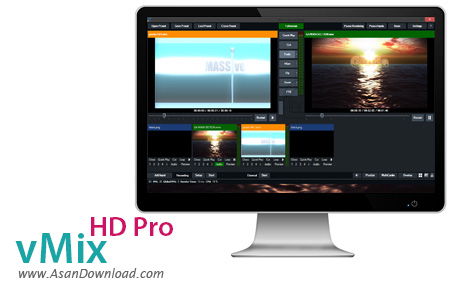
vMix HD Pro یکی از کارآمدترین نرم افزارها در زمینه ویرایش و تدوین فیلم هاست که امکان میکس آن ها را با بهترین کیفیت ممکن و انبوهی از قابلیت ها و طرح های آماده و همچنین افکت های بصری می تواند خروجی های فوق العاده متفاوتی را به کاربران ارائه دهد. یک واسط گرافیکی زیبا هم برای نرم افزار طراحی شده که علاوه بر ساده بودن به سهولت کار هم کمک می کند. سازگاری با انواع فرمت های ویدئویی، هماهنگی با آخرین متدهای ویرایشی و کیفیت های بالای ویدئویی یعنی HD، دریافت ویدئو از ورودی های مختلف، خروجی های متفاوت نرم افزار با کیفیت های مختلف، هماهنگی با سیستم های صوتی و تصویری قابل حمل و ده ها قابلیت دیگر از جمله مهم ترین و کلیدی ترین نرم افزارهای موجود در نرم افزار vMix HD Pro به حساب می آیند.
قابلیت های کلیدی نرم افزار vMix HD Pro:
- سازگاری با انواع ورودی ها برای ضبط فیلم ها
- ویرایش با بهترین کیفیت ممکن برای فیلم ها
- هماهنگی با انواع فرمت های ویدئویی
- پشتیبانی از ویدئوهای با کیفیت HD و صداهای چندکاناله
- گرفتن خروجی برای سیستم های مختلف صوتی و تصویری
- هماهنگی با انواع نرم افزارهای چندرسانه ای
- واسط گرافیکی بسیار جذاب و هیجان انگیز نرم افزار
- سازگار با نسخه های مختلف ویندوز از جمله ویندوز محبوب 7 و 8
- و ...


vMix is a professional application that comes packed with several video tools designed to help you record video streams from HDMI, HD-SDI, or SDI-compliant devices, apply various filters and special effects, as well as play video and audio files.
Although it comes packed with many dedicated parameters, it sports a clean and straightforward layout that gives users the possibility to add a wide range of file formats to the list, namely AVI, MKPV, MPEG, MP3, WAV, JPEG, PNG, BMP, an others.
What’s more, you can create video presets and save them to a file, switch to a full screen mode, set transition effects and customize the duration and type of transitions.
The application allows users to skip frames at a specified value, set the application’s priority for making it run at its full capacity, select between different audio and video codecs, specify a default saving directory where the recorded files are stored, configure the audio delay parameters, and perform audio mixing operations automatically.
When it comes to audio settings, you can change channel, gain, audio compressor, ratio, and threshold. The recorded video files can be exported to AVI, MPEG, WMV, or MP4.
Plus, the app lets you record videos without the audio streams and save them to AVI file format, and play multiple videos sequentially.
Other important options are represented by the possibility to use a live streaming service by specifying the URL, size, frame rate, and bitrate, apply overlaying options, add animations when the transition mode is enabled, create playlists and slideshows, and view statistics about queued files, resynchronized items, and other details as well.
Last but not least, the tool offers support for smart phones and Arduino-based tally light, keyboard shortcuts, locked buttons, as well as video mixing effects (e.g. cross fade, 3D zoom, wipe and cut effects) and video filters (e.g. colour correction, black and white level adjustments, deinterlace, sharpen, zooming and cropping options).
All in all, vMix offers a complete suite of tools for helping you perform various editing and mixing operations with videos files.


