



مدتهاست به فکر فروش دوره آموزشی خودتی، اما درگیر ساخت سایت، درگاه پرداخت، حفاظت از ویدیوها و پیدا کردن راهی برای فروش هستی؟
لازم نیست برای هرکدوم سراغ یک ابزار جدا بری یا درگیر مسائل فنی بشی.
با دورهساز میتونی سایت آموزشی خودت رو راهاندازی کنی، دورههات رو با خیال راحت بفروشی و دانشجوهات رو مدیریت کنی؛ همه در یک پلتفرم.
تو روی آموزش و رشد کسبوکارت تمرکز کن؛ دورهساز ابزارهای لازم رو در اختیارت
میذاره.
آمادهای تخصصت رو به یک کسبوکار آموزشی تبدیل کنی؟
بانک تمام الکترونیک بانک سامان عضو شبکه شتاب بانک مرکزی با پشتبانی آنلاین 24 ساعته بدون نیاز به تماس تلفنی از طریق چت آماده خدمت رسانی بدون نیاز به مراجعه فیزیکی به بانک می باشد.
مزایای افتتاح حساب در بانک سامان و دریافت کارت بلو بانک:
- افتتاح حساب رایگان به صورت آنلاین بدون حداقل یک ریال موجودی
- انتخاب رنگ کارت و ارسال رایگان کارت بانکی به آدرس دلخواه شما
- ارسال پیامک رایگان تراکنشهای حساب، بدون آبونمان سالانه
- انتقال هوشمند پول بدون نیاز به داشتن شماره شبا، پایا و ساتنا
- دریافت سود ماهیانه ۱۰%، ۳ ماهه ۱۲%، ۶ ماهه ۱۷% و یک ساله ۲۰/۵%
- دریافت وام بدون ضامن و وثیقه از ۲۰۰ تا ۱ میلیارد و۴۰۰ میلیون تومان
- افتتاح حساب بلوجونیور برای فرزندان ۷ تا ۱۴ ساله
- و...
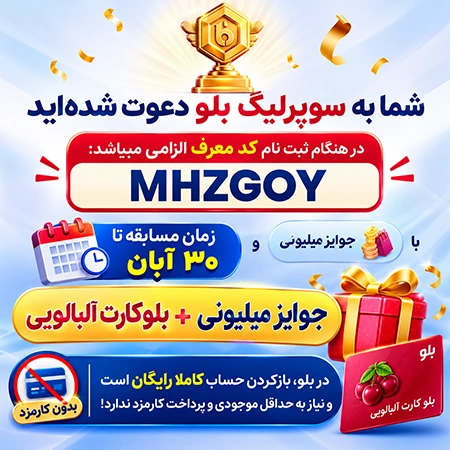
جهت دریافت هدیه 300 هزار تومانی هدیه ثبت نام فقط کافیه نرم افزار بلو بانک را از لینک های زیر بر روی گوشی هوشمند خود نصب کنید و کد معرف ( MHZGOY ) را داخل نرم افزار بلو بانک ثبت نمایید، بعد از احراز هویت و تکمیل مراحل ثبت نام هدیه 300 هزار تومانی معرفی را خیلی راحت دریافت نمایید!
- دانلود از بازار ، دانلود از مایکت ، دانلود نسخه اندروید لینک ، دانلود نسخه IOS لینک
در هنگام ثبت نام کد معرف الزامی میباشد: MHZGOY

نرم افزارهای زیادی بر روی كامپیوتر شما نصب هستند از قبیل MS-Office, WinZip, Windows Media Player, RealOne Player, AcdSee, Outlook Express و بسیاری دیگر، اكثر آنها به گونه ای می باشند كه هر كس میتواند از آنها استفاده كند و به اطلاعات موجود در آنها دسترسی و یا از آن برای انجام كارهای شخصی استفاده كند. شاید شما دوست ندارید با نرم افزاری كه متعلق به شماست و خود شما خریداری و نصب كردید كس دیگری استفاده كند! Password Door محصول شركت TopLang نرم افزاری برای گذاشتن پسورد
روی نرم افزارهای مختلف است به گونه ای با اجرا شدن نرم افزار صفحه ی
درخواست پسورد ظاهر شود و شما تنها با وارد كردن كلمه عبور صحیح بتوانید
وارد محیط نرم افزارها شوید! این نرم افزار به آسانی هر نرم افزاری رو
میتونه قفل گذاری كنه بدون ایجاد كوچكترین اختلالی در خود برنامه! خود نرم
افزار هم Password protected میباشد.
قابلیتهای كلیدی نرم افزار Password Door:
- قابلیت قرار دادن رمز عبور برای هر یک از برنامه های ویندوز
- لیست نمودن برنامه هایی که دارای رمز عبور می باشند در محیط نرم افزار
-
دارای ویژگی کشیدن و رها کردن ، به این صورت که کافیست آیکن برنامه را با
موس گرفته و به داخل محیط برنامه بکشید و آن را رها کنید، سپس تنظیمات خود
را اعمال کنید.
- دارای الگوریتم پیشرفته در رمز گذاری و به صورت 100%
تضمینی که از رمز عبور این نرم افزار بدون وارد نمودن رمز صحیح نمی توان
عبور کرد.
- قرار دادن رمز عبورهای دلخواه بر روی نرم افزار هایی که انتخاب می کنید.
-
ارائه گزارش به صورت LogFile از نرم افزارهایی که دارای رمز عبور می باشند
مشخص شده و زمان استفاده از آنها نیز ثبت می شود. به کمک این ویژگی شما می
توانید در صورت استفاده رمزعبور برنامه توسط دیگران و ساعت هایی که شما
از برنامه استفاده نکرده اید متوجه این موضوع شوید که آیا رمزعبور شما کشف
شده است یا خیر.
- استفاده آسان به وسیله رابط گرافیکی مناسب


Password protect programs on your computer: Windows Media Player, Real One, AcdSee, Outlook Express...
Password
Door can add the password protection feature to any program on your
computer. It will not modify the original programs, so it will never
destroy the programs and you will never lose data.
There are a lot of
fine software installed on your computer, you know them well:
MS-Office, WinZip, Windows Media Player, Real One Player, AcdSee,
Outlook Express. Most of them have no password protection, so anyone who
shares your workstation can launch one of these applications and use it
to browse or modify your data that was created by it. You don't want to
have to learn to use new software that have the password protection
feature, but you do want the password protection feature for your
existing software. Now you can use Password Door to add password
protection to any software. When software is protected by Password Door,
anyone who wants to use that software must enter the correct password
in order to launch it.
Password protects any program on your computer.
It
is very easy to protect a program: Password Door will automatically
detect all the installed programs on your computer and list them on the
main window, you only need to double-click at any item in the "Installed
Programs" list box, then specify a password for it, the program then
will be protected.
Password protects programs anywhere.
If
you protected a program, then all the instances of the program will be
totally protected, if you moved the program to another location, or
renamed the program, or installed a new instance of the program, the
protection will be still applied.
If you uninstalled a protected
program, the protection will be kept, once you re-installed the program
again, the protection then will be automatically enabled again.
Advanced features allow you protect almost 100% programs.
You
can simply use the drag and drop feature to protect any program. You
click at the "Target" icon in the main window of Password Door, and hold
down the left mouse button, then move to any existed window, release
left mouse button. Then the program who owned the window will be
automatically captured and protected. Password Door also supports to
protect programs with the "ClassName" and "Window Title" attributes.
Password Door will not modify any program.
Password
Door doesn't use the encryption mode to protect a program, it will not
modify the protected programs, or any file of the programs. So it will
never cause the programs to be destroyed and you will never lose any
data.
Protects Password Door itself.
You can
specify the admin password to protect the Password Door itself. Anyone
who want to launch the Password Door must enter the correct password.
The password also will protect the uninstaller, you must provide the
correct password in order to uninstall the software.
Supports schedule options.
Password
Door supports schedule options. For example: protect a program from
8:00 to 17:00 every day. The schedule option supports to protect
programs daily, weekly and monthly