




مدتهاست به فکر فروش دوره آموزشی خودتی، اما درگیر ساخت سایت، درگاه پرداخت، حفاظت از ویدیوها و پیدا کردن راهی برای فروش هستی؟
لازم نیست برای هرکدوم سراغ یک ابزار جدا بری یا درگیر مسائل فنی بشی.
با دورهساز میتونی سایت آموزشی خودت رو راهاندازی کنی، دورههات رو با خیال راحت بفروشی و دانشجوهات رو مدیریت کنی؛ همه در یک پلتفرم.
تو روی آموزش و رشد کسبوکارت تمرکز کن؛ دورهساز ابزارهای لازم رو در اختیارت
میذاره.
آمادهای تخصصت رو به یک کسبوکار آموزشی تبدیل کنی؟
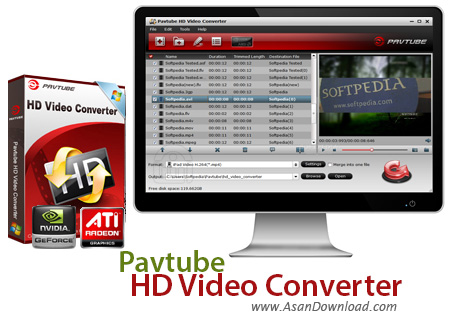
نرم افزار مبدلی که برای این پست در نظر گرفته ایم کار تبدیل فرمت های ویدئویی را به بهترین شکل ممکن امکان پذیر می سازد و با توجه به قابلیت هایی که دارد کمک می کند تا با بهترین کیفیت ممکن کاربر فیلم ها را تبدیل کند. نکته بسیار مهم و کلیدی در مورد Pavtube HD Video Converter پشتیبانی از فرمت هایی است که مبدل های دیجیتالی از آن ها برای ضبط فیلم ها بهره می گیرند و معمولا هم در بسیاری از سیستم ها به راحتی قابل پخش نیستند. پشتیبانی از فرمت های رایج ویدئویی و مخصوصا فرمت های استفاده شده در مبدل های دیجیتالی کمک می کند تا به راحتی کاربر آن ها را تبدیل نموده و برروی انواع پلیرها اجرا نماید. واسط گرافیکی بسیار جذاب، سرعت بالا در تبدیل، امکان تنظیم خروجی برای کیفیت و اندازه تصاویر دلخواه، پشتیبانی از کدک های مختلف ویدئویی، امکان عکسبرداری از محیط فیلم ها و ... از جمله دیگر امکاناتی هستند که در Pavtube HD Video Converter به چشم می خورند.
قابلیت های کلیدی نرم افزار Pavtube HD Video Converter:
- تبدیل فرمت های مختلف ویدئویی
- پشتیبانی از فرمت های استفاده شده در مبدل های دیجیتالی
- پشتیبانی از فیلم های با کیفیت بالا و HD
- واسط گرافیکی جذاب و کاربرپسند
- سرعت بالا در تبدیل فرمت های مختلف
- توانایی تنظیم خروجی با کیفیت و اندازه تصاویر دلخواه
- پشتیبانی از کدک های مختلف ویدئویی
- قابلیت ادغام و یا جداسازی فیلم ها
- امکان تهیه عکس از محیط فیلم ها
- سازگار با نسخه های مختلف سیستم عامل محبوب مایکروسافت ویندوز
- و ...


Pavtube HD Video Converter is an application that you can use to encode media files to multiple formats, including AVI, MP4, MPG and ASF. It can be easily handled by all user levels.
The interface of the program is clean and pretty intuitive. Media tracks can be imported into the queue via the file browser, treeview or "drag and drop" method. Batch processing is allowed.
In the list you can read the name, duration, trimmed length and output of each video. Once you establish the target profile and directory, you can proceed with the encoding job.
But you can also configure audio and video settings when it comes to the codec, size, bit rate, frame rate, channel mode, sample frequency rate and others. Options can be saved to a new profile or restored to their default values.
Furthermore, you can preview clips in a built-in media player and take snapshots, merge videos or trim them by marking the start and end position or time values, crop clips, add watermarks (text, image or video), make image adjustments (e.g. brightness, contrast), apply effects (e.g. grayscale, invert colors), replace the audio stream, and others.
During conversion you can check out a progress bar on all tasks, elapsed and remaining time, generated and estimated size, as long as view a log file, pause the task and enable Pavtube HD Video Converter to automatically turn off the computer once the task is completed.
The media conversion software runs on a very high amount of system resources, supports keyboard shortcuts, can guide you to a comprehensive online help file with snapshots, has a good response time, quickly finishes a task and manages to preserve a good image and sound quality in the output videos. We haven't encountered any technical issues during our testing and strongly recommend Pavtube HD Video Converter to all users.


