



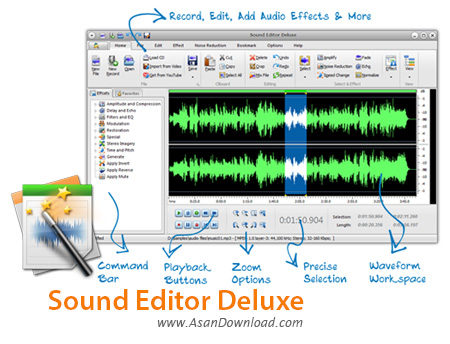
Sound Editor Deluxe نام نرم افزاری کاربردی و مناسب در زمینه کار با فایل های صوتی و ویرایش ساده آن هاست که در عین سهولت در استفاده امکانات بسیار مناسبی را هم در اختیاری کاربرانش قرار می دهد. نرم افزاری که با پشتیبانی از انواع فرمت های صوتی کار را برای اکثر استفاده کنندگان از این ابزار آسان می سازد. ضبط و ویرایش موزیک ها ، هماهنگی با ورودی های مختلف و صداهایی که از سیستم در حال پخش هستند ، کیفیت بسیار مناسب در ذخیره سازی و ویرایش ، امکان کپی کردن برروی انواع لوح های فشرده ، استخراج موزیک ها از لوح های فشرده و ... از جمله دیگر قابلیت های کلیدی نرم افزار Sound Editor Deluxe محسوب می شوند.
قابلیت های کلیدی نرم افزار Sound Editor Deluxe:
- ویرایش صداها با کیفیت و امکانات مناسب
- ذخیره سازی از انواع ورودی ها با بالاترین کیفیت
- توانایی رایت برروی انواع لوح های فشرده
- استخراج صداها از انواع سی و دی وی دی ها
- واسط گرافیکی ساده اما کاربرپسند
- پشتیبانی از انواع فرمت های صوتی
- چسباندن و ترکیب چند فایل صوتی
- سازگار با نسخه های مختلف سیستم عامل محبوب مایکروسافت ویندوز
- و ...


Sound Editor Deluxe is a program which comes packed with some powerful tools for recording, editing and burning audio tracks. It supports plenty of file types, including MP3, WAV, OGG and CDA.
The interface of the application is user-friendly; you can start a new file, record audio from external devices, load tracks from CDs, or use a text-to-speech tool. Songs can be imported by using either the file browser or 'drag and drop' function.
In addition, you can extract the audio stream from video files and work with it, download items from YouTube, edit ID3 tags, as well as change the sample rate and channel mode.
The tool integrates a wide range of effects for the audio files - these revolve around amplitude and compression, delay and echo, filters and equalization, modulation, restoration, stereo imagery, time and pitch, generation, invert, reverse, volume mute, and 'special' (phaser, reverb).
Additional features of Sound Editor Deluxe let you convert multiple audio formats at the same time, merge files, trim tracks, insert silence and files, mix files, reduce cassette and voice breath noise, set bookmarks, and add regions, just to name a few.
From the 'Options' tab, you can toggle between spectral and waveform mode, reconfigure keyboard shortcuts, access 'Windows Mixer', delete the recent files list, alter the default audio working location, as well as make the tool automatically play files when they are opened.
The audio processing utility includes guides for users, is pretty responsive to commands, supports the undo and redo function, and needs a moderate amount of CPU and system memory. We have not encountered any issues during our tests, such as program freezes or crashes. Inexperienced users may take a while to get accustomed to Sound Editor Deluxe's advanced features.


