



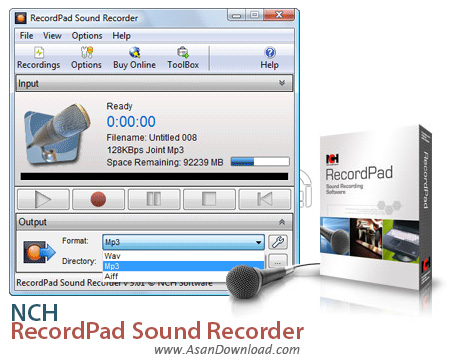
NCH RecordPad Sound Recorder نرم افزاری در زمینه ضبط صدا با بهترین کیفیت است که حجم بسیار پائینی داشته و به راحتی قابل استفاده است و توانایی ضبط صداها با فرمت های مختلف را نیز داراست. همچنین توانایی ضبط صدا از ورودی های مختلف نظیر میکروفون یا صدای خروجی از اسپیکر سیستم از جمله دیگر خصوصیاتی است که در این ابزار به چشم می خورد.
در مورد مدت زمان ذخیره سازی و ضبط صداها هیچ محدودیتی اعمال نشده است و کاربران می تواند برای دقایق طولانی به ضبط صداها بپردازند. NCH RecordPad Sound Recorder این قابلیت را دارد تا صداهای ضبط شده را از طریق ایمیل یا سرور FTP به صورت آنلاین از طریق خود نرم افزار در اختیار دیگر کاربران قرار دهد. با توجه به حجم بسیار مناسب نرم افزار برای کاربرانی که به ضبط صدا می پردازند می تواند گزینه ی بسیار مناسبی برای همه کاربران باشد.
قابلیت های کلیدی نرم افزار NCH RecordPad Sound Recorder:
- ضبط صدا با بهترین کیفیت ممکن
- توانایی ذخیره سازی با فرمت های دلخواه
- امکان به اشتراک گذاری صداهای ضبط شده به صورت آنلاین
- ضبط صدا از طریق ورودی های مختلف
- سهولت در استفاده از نرم افزار
- عدم محدودیت در مدت زمان ضبط صدا
- سازگار با نسخه های مختلف ویندوز از جمله ویندوز محبوب 7 و 8
- و ...


RecordPad Sound Recorder is a lightweight application whose purpose is to help users record audio streams to a file, provided that a microphone is connected to the computer.
It boasts a clean and straightforward layout that gives you the possibility to select the audio device and channel.
RecordPad Sound Recorder allows you to play, pause, or stop the recording session, view the length of the recorded file, check a list with all the recordings, as well as play, pause, or stop the current audio selection, and adjust the volume.
The audio recordings can be saved to WAV, MP3, or AIFF file format, and you are allowed to specify a default saving directory.
One of the top features bundled into RecordPad Sound Recorder is a smart system that lets you filter the recordings by duration and date.
What’s more, the tool lets you perform speech searches by specifying keywords, play the selected files to a slow or fast speed, and save the selected recording to a new location.
When it comes to configuration options, you can limit a recording session to a user-defined time, set up the audio parameters for each output profile (e.g. encoding, format, bitrate), perform command-line operations, and play sound notifications at the start and end of the recording operation.
Last but not least, it is possible to send the recordings via email, upload them via FTP servers, make the utility run at Windows startup, display warning messages when the hard drive space is below a certain value, as well as assign hotkeys for various tasks (e.g. record, pause, stop).
All things considered, RecordPad Sound Recorder offers a handy set of features for helping you carry out the recording process, and is suitable for beginners and professionals alike, thanks to its straightforward approach.


