




مدتهاست به فکر فروش دوره آموزشی خودتی، اما درگیر ساخت سایت، درگاه پرداخت، حفاظت از ویدیوها و پیدا کردن راهی برای فروش هستی؟
لازم نیست برای هرکدوم سراغ یک ابزار جدا بری یا درگیر مسائل فنی بشی.
با دورهساز میتونی سایت آموزشی خودت رو راهاندازی کنی، دورههات رو با خیال راحت بفروشی و دانشجوهات رو مدیریت کنی؛ همه در یک پلتفرم.
تو روی آموزش و رشد کسبوکارت تمرکز کن؛ دورهساز ابزارهای لازم رو در اختیارت
میذاره.
آمادهای تخصصت رو به یک کسبوکار آموزشی تبدیل کنی؟
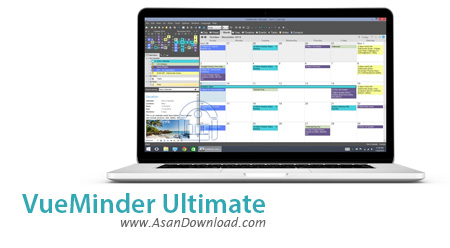
VueMinder Ultimate نام نرم افزاری است که تقویمی جالب با امکانات فراوان و بی نهایت را به کاربران ارائه می دهد. نرمافزاری بسیار کاربردی که توانایی های بسیاری در مدیریت کارها براساس تقویم روزمره دارا بوده و انواع برنامه ریزی های مدرن را می توان با آن انجام داد.
واسط گرافیکی مدرنی که این ابزار دارد کمک می کند کاربران ساده تر به خواسته های خود دست پیدا کنند ؛ نرم افزار به صورت خودکار یادرآوری ها را به صورت پست الکترونیکی یا پیامک (SMS) به کاربران اعلام می کند تا هیچ یک از برنامه های از قبل تعریف شده از خاطر فراموش نشود. توانایی همگام سازی با تقویم گوگل و Outlook هم از نکات مهمی است که با استفاده از آن به راحتی می توان گوشی های تلفن همراه هوشمند و این نرم افزار را همگام نمود.
قابلیت های کلیدی نرم افزار VueMinder Ultimate:
- واسط گرافیکی مدرن و کاربردی نرم افزار
- توانایی همگام سازی با تقویم گوگل و Outlook
- امکان هشدار و یادآوری به صورت ایمیل یا SMS
- سهولت در بهره گیری از نرم افزار
- تقویم یکپارچه با دسکتاپ کاربران
- امکان وارد کردن مناسبت ها ، نوشته ها و یادداشت ها از طریق Excel
- سازگار با نسخه های مختلف ویندوز از جمله ویندوز محبوب 7 و 8
- و ...


VueMinder Ultimate is a rich-featured software application designed to help you schedule tasks and appointments, in order to manage upcoming events more efficiently.
The app comes with a professional-looking interface whose window can be maximized on the screen. It is possible to set up a new event, recurring event or all-day event by supplying VueMinder Ultimate with all sorts of details, such as the location, start and end time, recurrence pattern and file attachments.
From this point on, you can either send the task via email, print the details, save the information to the calendar, or export data to the HTML format. Tasks can be viewed in several methods, according to the viewing mode (daily, weekly, monthly) - in overlay, separate date/calendar columns, or only the work days, just to name a few.
More appearance customization settings are available in the View menu; for instance, you can switch to full screen mode, disable the appearance toolbar or navigation pane, and set events apart by using colors. Plus, you may create categories, priority types, locations and contacts.
Other features of VueMinder Ultimate involve subscriptions to online calendars (e.g. Google Calendar), calendar synchronization, data backup and restoration, data transfers to USB flash drives, a search function, and others.
The Options screen is filled with more configuration settings, for skilled users. For instance, you can make VueMinder Ultimate automatically run at system startup, minimize to the system tray area or perform regular update checkups, as well as set up proxy parameters.
In addition to VueMinder Lite and VueMinder Pro, the Ultimate version grants extra features to users; for example, you can share notes, tasks and contact data over a local network, as well as define custom input fields for contacts, events, tasks and notes.
VueMinder Ultimate supports multiple UI languages, has a good response time, includes user documentation, and requires a moderate-to-high amount of system resources to work properly. No error notifications have been shown throughout our evaluation and the app did not hang or crash.
All in all, VueMinder Ultimate is a full-featured desktop calendar which comes bundled with plenty of useful and attractive choices for all levels of experience. However, you can switch to VueMinder Pro (less comprehensive edition) or VueMinder Lite (compact version).


