




مدتهاست به فکر فروش دوره آموزشی خودتی، اما درگیر ساخت سایت، درگاه پرداخت، حفاظت از ویدیوها و پیدا کردن راهی برای فروش هستی؟
لازم نیست برای هرکدوم سراغ یک ابزار جدا بری یا درگیر مسائل فنی بشی.
با دورهساز میتونی سایت آموزشی خودت رو راهاندازی کنی، دورههات رو با خیال راحت بفروشی و دانشجوهات رو مدیریت کنی؛ همه در یک پلتفرم.
تو روی آموزش و رشد کسبوکارت تمرکز کن؛ دورهساز ابزارهای لازم رو در اختیارت
میذاره.
آمادهای تخصصت رو به یک کسبوکار آموزشی تبدیل کنی؟
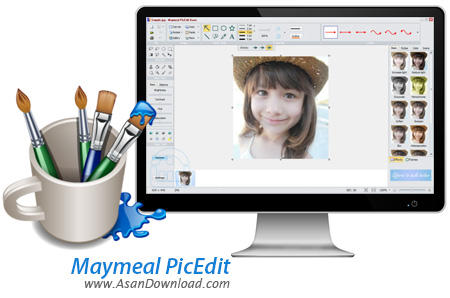
Maymeal PicEdit نرم افزاری کاربردی و قدرتمند برای ویرایش سریع و آسان تصاویر می باشد. این نرم افزار که بسیار کم حجم می باشد و به صورت رایگان ارائه شده است جهت ویرایش تصاویر می باشد که با داشتن انواعی از قابلیت ها شما را قادر می سازد تا به راحتی و به سادگی تصاویر را ویرایش کنید. تنظیم نور ، رنگ ، چرخش عکس ها و چندین و چند قابلیت دیگر از جمله امکانات ساده ای هستند که این نرم افزار در خود جای داده است.
از ویژگی های دیگر این نرم افزار برش دادن، چرخش، حاشیه نویسی و ... بر روی تصاویر می باشد. داشتن اشکال مختلف نظیر فلش ها ، انواع چهار ضلعی ها و ... از امکانات دیگری هستند که شما می توانید برای ویرایش عکس ها از آن ها بهره بگیرید.
قابلیت های کلیدی نرم افزار Maymeal PicEdit:
- قابلیت ویرایش سریع و آسان تصاویر
- امکان تغییر در رنگ، روشنایی، اشباع، تاری و ...
- وجود انواع اشکال گرافیکی نظیر فلش ، مستطیل ، چند ضلعی ، متن
- محیط کار ساده و کاربر پسند
- سازگار با تمامی نسخه های ویندوز از جمله ویندوز محبوب 7 و 8
-و ...


Maymeal PicEdit is a professional software application designed to help users edit images by applying several special effects and embedding watermarks and stamps.
Since this is a portable program, it is important to mention that it doesn’t leave any traces in the Windows Registry. You can copy it on any USB flash drive or other devices, and take it with you whenever you need to edit photos on the fly.
Although it comes packed with many editing functions, it boasts a clean and intuitive layout that allows you to add files by simply dragging and dropping them into the primary pane or using the built-in browse function.
The tool offers support for the following file formats: BMP, JPG, PNG, or GIF.
Maymeal PicEdit gives you the possibility to insert arrows, lines, rectangles, ellipses, and polygons, rotate the image to different angles, zoom in or out, and set up the canvas parameters.
What’s more, you are allowed to add text messages in the desired area, select the text transparency, and add a background layout (e.g. circles, triangles, rectangles).
The program lets you embed watermarks, specify their rotation angle and opacity, set up the margin parameters, and upload an image from the computer (e.g. BMP, JPG, PNG) or pick a background color.
Other notable characteristics bundled in this app are represented by the possibility to adjust the levels of brightness, contrast, hue, and saturation, alter the RGB value, use a brush for changing the color of the skin and hair, remove the red eye effect, and apply mosaic effects.
Maymeal PicEdit comes packed with various special effects and offers a preview mode for each of them, such as grayscale, monochrome, increasing or decreasing light, denoising option, warm yellow or red images, and others.
Last but not least, you can choose between different frames, perform basic editing operations (cut, copy, paste, delete), print the photo, copy it to the Clipboard, or save to a file, as well as undo or redo your actions.
All in all, Maymeal PicEdit proves to be a reliable graphic editor that bundles many useful functions. The feature pack is solid and, given its ease of use, this tool could be one of the first choices for all types of users, regardless of their experience level.


