



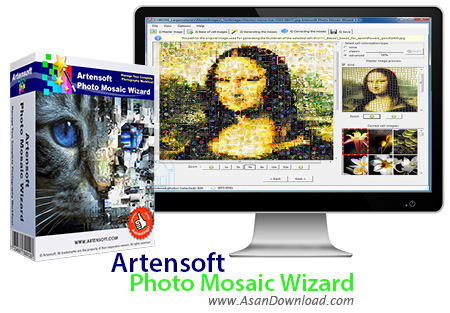
احتمالا تصاویر موزائیکی که از گردهم آمدن تصاویر کوچک در کنار هم تشکیل می شود را دیده اید. ساخت این تصاویر شاید برای بسیاری از کاربران کار سختی به نظر برسد اما با داشتن نرم افزار مانند Artensoft Photo Mosaic Wizard به راحتی می توان طی مراحل کوتاهی این گونه تصاویر را با سلیقه شخصی پدید آورد و با بهترین کیفیت ممکن و با اندازه دلخواه ذخیره نمود.
تنها 5 مرحله لازم است تا کاربران تصاویر موزائیکی را خلق کند ؛ انتخاب تصاویر اولیه ، انتخاب تصاویر کوچک برای خلق عکس اصلی ، تولید تصاویر نهایی ، تغییر سایز و حرکت تصاویر کوچک و در نهایت ذخیره سازی 5 مرحله ای هستند که در نرم افزار Artensoft Photo Mosaic Wizard برای ساخت عکس های موزائیکی وجود دارند. استفاده از نرم افزار بسیار ساده است و مبتدی ترین کاربران هم می توانند به راحتی از این ابزار بهره بگیرند. انعطاف پذیری بالایی که نرم افزار در ویرایش کوچک ترین قطعات از تصاویر دارد باعث می شود تا خروجی های بسیار با کیفیت و زیبایی پدید آید.
قابلیت های کلیدی نرم افزار Artensoft Photo Mosaic Wizard:
- ساخت تصاویر موزائیکی زیبا و جذاب
- سهولت در استفاده از نرم افزار و ساخت تصاویر موزائیکی
- امکان ساخت عکس ها با سلیقه شخصی
- توانایی ذخیره سازی با فرمت ، کیفیت و اندازه دلخواه
- تولید عکس های موزائیکی تنها در 5 مرحله
- انعطاف پذیری بالای نرم افزار در تولید عکس ها
- سازگار با نسخه های مختلف ویندوز از جمله ویندوز محبوب 7 و 8
- و ...


Artensoft Photo Mosaic Wizard is an application that allows you to create complex photo mosaics by loading a master image and reconstructing it from small cell photos.
You can modify the rotation angle of the cell images in the mosaic and also you can adjust the colorization type of the final photo.
Make unique posters and photo mosaic with Artensoft Photo Mosaic Wizard! The new photo mosaic software will generate stunning mosaics out of ordinary photographs. Photo mosaic maker Artensoft Photo Mosaic Wizard does complex math to fit cell images so that they form the most realistic mosaic without any color overlays.
With photomosaic maker, you can make and print stunning posters and photo wallpapers, make unique photo collages, make perfect photo gifts, and design stunning photo montages in just moments. Your creative possibilities with photographic mosaic software are truly unlimited! Making your own photomosaic could not be made simpler.
Artensoft Photo Mosaic Wizard will create true mosaic images out of regular images in five easy steps. First, load your master image - the image that will be seen when your photo mosaic is complete. The next step lets you choose pictures to be used as tiles. You can save them and skip this step next time.
The following step will generate your photomosaic - it takes just a few moments! From there, you can fast-forward to saving your photomosaic in a format of your choice - or try and optimize your mosaic by moving, rotating or replacing cell images.
Artensoft Photo Mosaic Wizard will make you better, more realistic photomosaics without using any third-party tools; no Photoshop is required. Instead of simply overlaying cell images over the master image and blending the colors, photo mosaic maker will solve a complex mathematical task of matching and placing cell images without modifying cell images or altering their colors.


